Time management: A guide
Alumni & Career
Note from the Editor: It’s a new semester, I’m juggling multiple major projects as usual, and as such I was asked to write a piece for the Bulletin on time management. I hope this is helpful!
I used to joke that I worked “9 to 5 and 5 to 9.” This was back in the Boston area, where I completed my first MA thesis in the evening while working a full-time job. After that was done, I wrote two novels, published them, did all my marketing, and more. Then I moved overseas and completed a second master’s degree while working multiple part-time jobs and volunteering for an NGO.
How? Time management and organizational skills helped a lot.
I wasn’t always very good at time management. To-do lists were overwhelming, and I tended to just chip away at anything I needed to work on, without a real strategy – I muddled through and turned things in on time in the end, though there were a lot of close calls. That was in college, however, when things were a bit easier. Grad school is another level, and so is the working world. I had to figure out how to juggle multiple major projects and critical tasks, produce good work, and also get enough rest (important!), see friends, etc.
Thankfully, by the time the MPP came around, I had already been doing this type of thing for over a decade. Here, then, are some of my thoughts on organization/time management, and what I specifically do to keep everything organized.
What I do
Some systems are fantastic for one person and essentially useless for the next. Some people need paper planners; others need five different apps to keep them organized. It’s not bad to use different systems all joined together – if it works, it works. (See the Q&A section at the bottom for tips.) However, the underlying principles are worth thinking about. In my case, I realized after years of frustration with planners that I think in terms of projects, not lists. This completely shifted how I approach my work, the tools I use, etc., and allowed me to design a project-management-based system that essentially runs itself.
My system only has two components: a calendar and an integrated to-do app. Together, these form what I’m calling a control center: a place where you can see what’s going on, know what you need to work on next, etc. My calendar/control center is the first thing I check – it’s organized visually so I can see at a glance four things: (1) long-term projects, (2) current schedule, (3) time blocks where I can work on ongoing projects, and (4) tasks that must be done that day. Further tasks can be accessed via my to-do app. Below is a visual breakdown of my system:
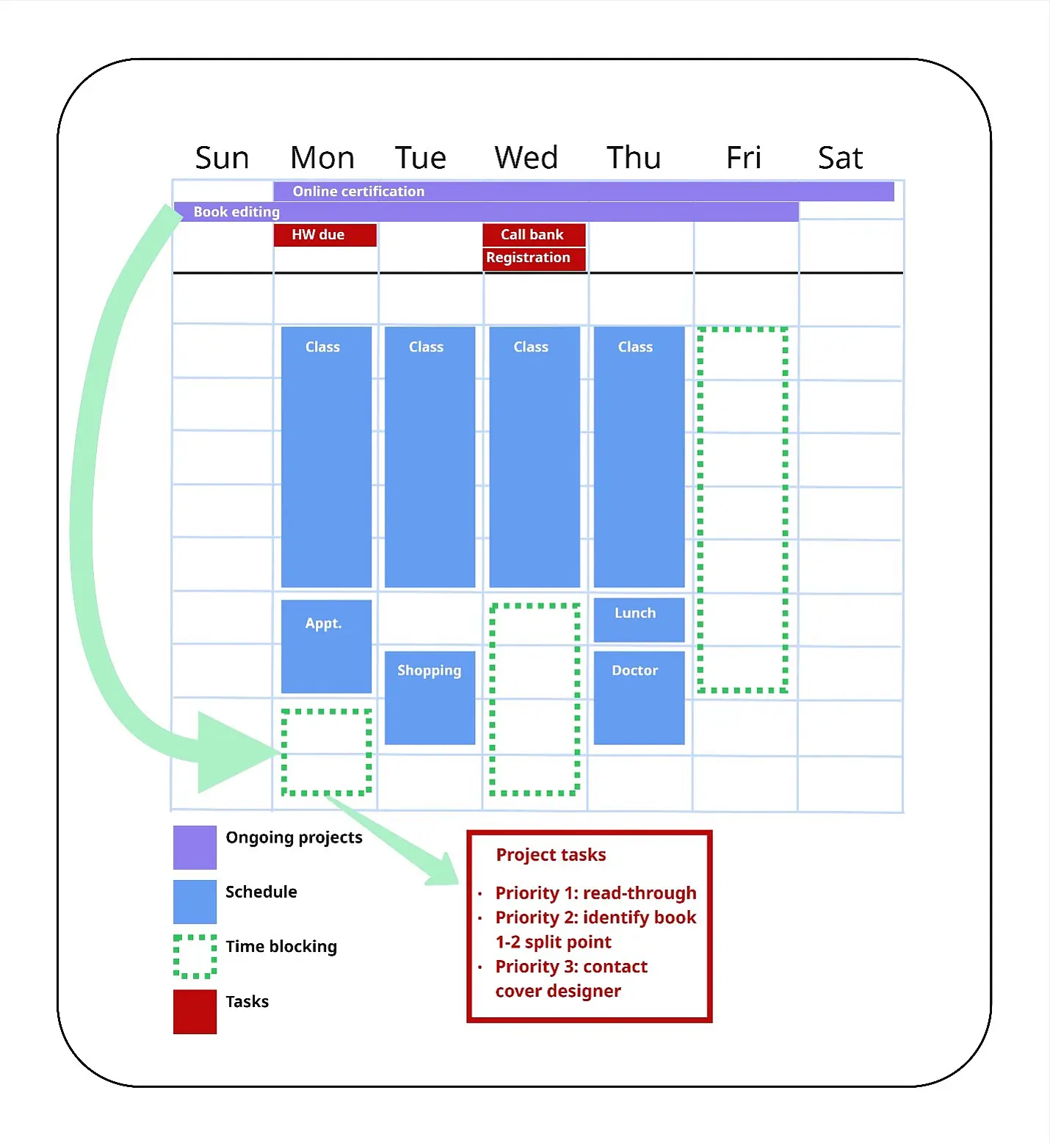
As you can see, the main section is just schedule + time blocks. The time blocks are where I pull in projects to work on, and complete a series of tasks that I have already prioritized/built into my project planning (see below). In this way, the system serves up important tasks for me based on whatever I want/need to work on. It’s the same chipping-away strategy I used in college, just thought through a lot more deeply, and because I can see everything at once, I tend not to forget things.
How it works/how to use it
The projects (purple) sit at the top of my calendar. These show me what I’m currently working on, and what I have the option to work on during time blocks. Note: I do not write down every class etc. here. That’s too cluttered and can be overwhelming. I just write down major projects: outside courses, book editing, etc. You can do as you like, but I recommend only having 2-3 current projects here.
My regular schedule (blue) is what I work around. I fill this in and then don’t worry about it. New events get added here.
Time blocks (green, dotted line) are where I have free time. This is where I work on the things that need to get done for various projects/classes. I either pick from one of the projects at the top or one of the other things I know are ongoing.
Tasks (dark red) are based on projects. When I add start dates/deadlines/priorities to them, they get fed into my calendar. See below for how to do this.
In short, I think in terms of long-term (projects), day-to-day (schedule/time blocks), and a to-do list (tasks), all at once, and my app feeds the most important ones directly to me without me having to do extra thinking. As someone who does 5-6 major projects at any given time, this is huge.
Projects and tasks: Planning, assigning, and adding to calendar (or: how do I use this system?)
Planning
First, basically everything is a project. A course with homework is a project. German study is a project. A thesis is a (really big) project. Even “general admin” is a project…because it can be turned into a to-do list with various important and less-important tasks that can be prioritized. If you’re starting with a huge to-do list and have no idea where to begin, organize it conceptually and think of those as your projects. Include a “general” category. Then use the principles below.
Each project is different. I look at what’s required and break it into its logical components and then think about how the tasks should work.
For example, German study means ongoing progress across a number of areas, which I can track daily: vocabulary, grammar, speaking, listening, etc. I can use a set of repeating tasks and do as many as I can each day: read 10 pages, learn 20 words, listen to a podcast, etc. These are cumulative. They don’t depend on completing other steps to get done.
However, publishing novels means dealing with multiple tracks: editing, book cover design, marketing, etc., with a specific timeline for each. Sometimes these tracks are parallel; sometimes one depends on the other being completed first. I separate the tracks, write everything that needs to be done for each track (tasks/subtasks), sort those tasks into chronological order, add prioritization and deadlines if possible, and then build a rough timeline for each track: (1) estimating time for each task and (2) planning backward from deadlines to give myself enough time to accomplish everything. That gives me a workable start date and overall timeframe.
For example, a partial list of tasks for re-publishing a book as two books:
| Task | Priority |
|---|---|
| Figure out split point for book 1 | High |
| Edit book 1 | Medium |
| Edit book 1.1 | Medium |
| Edit book 1.2 | Medium |
| Page counts for 1.1 and 1.2 to cover designer | High |
| ISBN numbers (purchase/assign) | Low |
| Library of Congress submissions (1.1, 1.2) | Low |
| Export books 1, 1.1, and 1.2 | Medium |
| Prepare uploads for publisher site | Medium |
| Edit book 2 | Low |
| Titles | High |
| Get covers [subtask: reach out to cover designer] | High |
After listing these, I set them in time order (example: I have to edit and export Book 1.1 and give it a new title before I can assign it an ISBN). After ordering the tasks, I would set the priority (high/medium/low) for each. For the most part, prioritization is based on deadlines/time estimated to accomplish something, and whether something must be done to start the next task/phase. That means that although “Get covers” can happen after editing, it’s still high priority – it has to be in place ASAP in order for me to do any real preparation for publishing. I would therefore assign it Priority: High and schedule, not just list, a subtask, by which I mean adding a specific date so the subtask “reach out to cover designer” appears in my calendar. That way I at least start the process even as I’m still editing. Cover designers need time to fit you into their schedule!
General admin, by the way, is similar: the high-priority items go to the top of the list, things necessary to accomplish those items get listed as sub-tasks, and low-priority but recurring items (e.g., grocery shopping) get added as calendar reminders. Deadlines/scheduled start dates mean that the app pushes tasks to you at the appropriate time.
Quick guide:
- Work out the project structure/list all tasks/organize them in chronological order.
- Timeline: Give tasks/subtasks deadlines and priorities (high, medium, low). Calculate backward from the final deadline to get a reasonable start date for the project.
- Enter tasks in your to-do app with all the above info (priority, deadline, start date if needed). This pushes them into your calendar as tangible to-dos. NOTE: No start date: appears in the to-do app but not as a specific event in your calendar. (I schedule about half my tasks and work on the others on an ongoing basis.)
- In the calendar itself, add a project bar at the top that runs from the start date to the deadline. This gives you a “here’s what you are working on now” visual reminder.
- You’re all set! To work on something, just pick a project, pick a time block, check the current tasks for that project, and go.
Congrats, that’s all. Your app + calendar combination should now run without any extra work or thinking about when you need to start what.
Other Questions
1. Which program(s)/app(s) should I use?
That’s up to you. In one sense, it’s easiest to use a single ecosystem – such as from one company – for everything (documents, reminders, to-do lists, calendar, saved info, and so on), but I use the tools that work best for me, which is a combination. I did a lot of experimenting and ended up settling on a mix: a calendar plus an unrelated task app that I could integrate, and a number of options for individual projects. Sometimes for very large projects (e.g., thesis, novels) I’ll even outsource the task list and just have one task in my control center: “Work on thesis.” The full task list is within the environment I use for the project.
For example, for German study I use two different programs/platforms to keep track of a wide variety of info, and an app to track my progress. For my thesis I hand-built an entire custom dashboard in one program to give me all the tools I needed, including a progress log and word counter.
That said, the fewer integrated programs/apps involved (especially for the control center), the less likelihood of forgetting a task/event. In the to-do app I use, you can assign priorities, add subtasks, and add deadlines/start dates, and the app pushes the high-priority ones to the top for you, as well as notifies you when things are overdue (which I haven’t found to be the case in certain other apps). Many apps can be used for free; I do pay for mine, because it means more variety for projects, but the free version is still incredibly helpful. It can also be worth talking to other people and seeing what they use.
2. What about paper planners?
I love paper planners. For one thing, they make it harder to accidentally write down the wrong date (cough). I also like planning projects on paper – drawing out timelines and such can be helpful, and writing on paper can generally be very useful for thinking things through and visualizing how parts of a project go together.
When I use a paper planner, I write down individual tasks for each day with little checkboxes and carry them over if unfinished. For projects, you can just write the ongoing ones on the side of the page and do light project planning in a separate notebook (or possibly in the planner directly). Same concept. I just prefer to have reminders from my phone/computer, which is why I end up ultimately putting everything in digital form.
3. How do I get started?
Sometimes projects can be overwhelming. Focusing on individual sub-tasks to start with can help (instead of looking at everything at once), as can keeping a progress log. I did that for my thesis: I kept a log of what I had done, what I needed to do going forward, etc. It kept me motivated and reflected real progress.
Sometimes, motivation isn’t enough: in that case, just work on something from another project. It’s still progress!
4. What about AI?
I tend to be cautious about AI, but it can be useful for things like “help me prioritize/build a non-overwhelming schedule with the following limitations/tasks.” That said, I use it as an additional tool (at times), not as my main approach.
5. How do you approach a huge project like a thesis?
That’s a topic for another blog entry!
~ The views represented in this blog post do not necessarily represent those of the Brandt School. ~
About the Author

Sabrina Zearott is a 2025 MPP graduate of the Brandt School, where she focused on energy policy and critical minerals and is the current Bulletin editor. Previously, she completed an MA in communication (media theory/analysis); she is also a science writer, has published two novels under a pen name, and generally enjoys taking on far too many projects at once. She comes from the United States.
![[Translate to English:] Facebook Icon](/fileadmin/SocialMediaIcons/iconfinder_06-facebook_104498.svg "Fakebookseite der Staatswissenschaftlichen Fakultät")
![[Translate to English:] Youtube Icon](/fileadmin/SocialMediaIcons/iconfinder_18-youtube_104482.svg)


![[Translate to English:] facebook icon](/fileadmin/SocialMediaIcons/iconfinder_06-facebook_white.svg)
![[Translate to English:] twitter icon](/fileadmin/SocialMediaIcons/iconfinder_03-twitter_white.svg)
![[Translate to English:] instagram icon](/fileadmin/SocialMediaIcons/iconfinder_38-instagram_white.svg)
![[Translate to English:] YouTube icon](/fileadmin/SocialMediaIcons/iconfinder_18-youtube_white.svg)
![[Translate to English:] xing icon](/fileadmin/SocialMediaIcons/iconfinder_xing_white.svg)